
@jsquash/resize Algorithm Reference
Choosing the Right Resampling Algorithm IMPIB - User reference documentation
Introduction
This document explains the eight resampling algorithms available in the @jsquash/resize library and provides practical guidance on choosing the right one for your images. These algorithms control how pixel values are calculated during resizing - the choice affects sharpness, smoothness, artefact levels, and processing speed.
Note: All algorithms below are resampling (downscaling/upscaling) filters, not lossy compression codecs. They determine how image data is interpolated when dimensions change. The final file size depends almost entirely on the codec (WebP, AVIF, JPEG) and quality settings used after resampling - the choice of resize algorithm has very little effect on file size.
What Is Resampling?
When you resize an image - shrinking a 4K photo to an 800px thumbnail or enlarging a small product image - the software must decide what colour value each new pixel should have. This calculation is resampling, and the mathematical formula used is the resampling algorithm (also called a filter or kernel).
The key trade-offs for every algorithm are:
- Sharpness vs. smoothness - sharper filters preserve fine lines but can introduce ringing or aliasing; smoother filters reduce artefacts at the cost of perceived softness.
- Speed vs. quality - simpler kernels (Triangle) are much faster; higher-quality kernels (Lanczos3, Magic Kernel Sharp) are slower.
- Kernel radius - larger kernels consider more surrounding pixels - higher potential quality, higher computational cost.
💡 For beginners: If you just want the best default for most photos, pick Lanczos3 (the app default). It gives excellent results for the vast majority of photographic images. Only consider other algorithms if you have a specific reason (pixel art, speed, etc.).
Getting Started: Plain English Guide
New to image resizing? This section explains the core ideas in plain language before you look at the individual algorithms.
What is a “kernel”?
When you resize a photo from 4000×3000 pixels down to 800×600, the new pixels don’t exist in the original file - the computer has to invent values for them. It does this by looking at the surrounding source pixels and mixing their colours together, weighted by how close they are.
The mathematical recipe that decides which pixels to look at and how much weight to give each one is called a kernel (or filter).
- A small-radius kernel looks at just a few nearby pixels - fast, but can produce soft results (Triangle).
- A large-radius kernel considers many more pixels - slower, but can produce sharper, more accurate results (Lanczos3, Magic Kernel).
  Source pixels around target ×
  ┌───┬───┬───┬───┬───┐
  │░░░│░░░│▒▒▒│░░░│░░░│  Low weight (far away)
  ├───┼───┼───┼───┼───┤
  │░░░│▒▒▒│███│▒▒▒│░░░│  High weight (close)
  ├───┼───┼───┼───┼───┤
  │░░░│░░░│▒▒▒│░░░│░░░│  Low weight (far away)
  └───┴───┴───┴───┴───┘
           ↑ target pixel = weighted mix of all of these
What are blur and ringing - and why do they matter?
Every resize algorithm makes a trade-off between two types of visual problem:
Blur - The new pixels are over-smoothed across their neighbours. Edges become soft and fine detail (grass, hair, text) is smeared. Triangle (bilinear) does this - harmless for thumbnails, not ideal for print or final exports.
Ringing - Some algorithms use a wave-shaped function to preserve fine detail. This works beautifully on most images, but on photos with very sharp, high-contrast edges (e.g. a dark window frame against a bright sky, or a hairline against a light background), the oscillating wave creates faint halos on both sides of the edge.
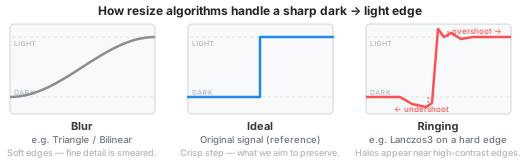
Ringing is most noticeable on portraits near hairlines or sharp clothing edges against a plain background. On natural textures like grass, stone, or fabric it is barely visible - which is why Lanczos3 is still an excellent algorithm for most photography.
What does “sharpening” mean?
The base Magic Kernel is slightly blurrier than ideal (it over-smooths a little at edges). The MK Sharp 2013 and MK Sharp 2021 variants fix this by running a lightweight extra pass that boosts contrast at edges - making the image look crisper. This extra pass is called sharpening.
- More sharpening → crisper, more “pop”, but slightly amplifies noise and ringing.
- No sharpening → smoother, closer to mathematically perfect.
Sharp 2013 adds a practical, slightly punchy boost (what Facebook found best in real-world use). Sharp 2021 applies an exact mathematical correction with no net sharpening.
Which algorithm should I pick?
flowchart TD
    A([Start]) --> B{"Pixel art<br/>or sprites?"}
    B -->|Yes| C([HQx])
    B -->|No| D{"Need maximum<br/>speed?"}
    D -->|Yes| E([Triangle])
    D -->|No| F{"Noisy or<br/>high-ISO source?"}
    F -->|Yes| G([Mitchell])
    F -->|No| H{"Best quality -<br/>OK to wait?"}
    H -->|Yes| I([MK Sharp 2013])
    H -->|No| J([Lanczos3 - default])
It is safe to experiment
The original file is never modified by this app - all processing happens on a copy in memory. You can switch algorithms and re-compress as many times as you like with no penalty. Start with Lanczos3. If you notice halos on a portrait, try Mitchell. If results look too soft, try Catmull-Rom or MK Sharp 2013.
Algorithm Quick-Reference
Quality and Speed ratings are relative (★★★★★ = best). Speed benchmarks are approximate - actual times depend on image size and hardware.
| Algorithm | Internal name | Best For | Avoid For | Quality | Speed |
|---|---|---|---|---|---|
| Lanczos3 | lanczos3 | Landscapes, architecture, fine detail, general photos | High-ISO / noisy images (amplifies grain) | ★★★★★ | ★★★ |
| Mitchell | mitchell | General purpose, mixed scenes, noisy images | Ultra-fine textures (slight blur) | ★★★★ | ★★★★ |
| Catmull-Rom | catrom | Product shots, sharp edges, illustrations | - | ★★★★ | ★★★★ |
| Triangle | triangle | Thumbnails, previews, batch pipelines | High-quality final exports | ★★★ | ★★★★★ |
| HQx | hqx | Pixel art, game sprites, retro graphics | Photography (not designed for it) | ★★★★★ | ★★★ |
| Magic Kernel | magicKernel | Enlargements, detail preservation | Fast pipelines (slower algorithm) | ★★★★ | ★★ |
| MK Sharp 2013 | magicKernelSharp2013 | General use, slight sharpening (Facebook/Instagram) | Speed-critical workflows | ★★★★★ | ★★ |
| MK Sharp 2021 | magicKernelSharp2021 | Maximum mathematical accuracy | Speed-critical workflows (slowest) | ★★★★★ | ★ |
The “Internal name” column shows the value used in the code and settings. This is what you’ll see in the app’s Algorithm dropdown.
Algorithm Details
1. Lanczos3
Lanczos3 is a high-quality sinc-based filter with a radius of 3 lobes. It is widely considered one of the best all-round resampling algorithms for photographic content.
- How it works: It approximates the mathematically ideal sinc function, windowed (cut off) at 3 lobes. This means each output pixel considers a relatively wide neighbourhood of source pixels.
- Strengths: Exceptional detail preservation, crisp edges, excellent for landscapes, architecture, and any scene with fine textures or repeating patterns.
- Weaknesses: Can produce ringing artefacts (faint halos) near sharp high-contrast edges.
- Speed: Moderate - slower than Triangle or Mitchell but acceptable for most workflows.
- Typical use: Final export of landscape and architectural photography; high-resolution editorial images; the app’s default.
⚠️ Watch out: Lanczos3 amplifies noise. Avoid it for high-ISO or low-light photography - it will make grain more visible. Pre-denoise before applying, or switch to Mitchell.
Learn more: Wikipedia - Lanczos resampling · ImageMagick filter guide
2. Mitchell (Mitchell-Netravali)
Mitchell is a bicubic filter designed to balance sharpness and smoothness. Its parameters (B=⅓, C=⅓) sit at the “sweet spot” identified by Mitchell and Netravali in their 1988 paper for general-purpose resampling.
- How it works: Uses a cubic polynomial with carefully chosen parameters that minimise both blurring and ringing. The (B=⅓, C=⅓) choice is a well-known compromise.
- Strengths: Versatile all-rounder. Handles mixed-content scenes well. Naturally softens high-frequency noise, making it a good choice for high-ISO shots.
- Weaknesses: Very slight blurring of the finest textures compared to Lanczos3 or Catmull-Rom.
- Speed: Fast - a practical default for web and app workflows.
- Typical use: General web photography, mixed scenes, street photography, noisy images.
Learn more: Mitchell-Netravali paper (PDF) · Wikipedia - Mitchell-Netravali
3. Catmull-Rom
Catmull-Rom is a bicubic filter (B=0, C=0.5) known for producing sharper results than Mitchell with no pre-blurring. In @jsquash/resize this algorithm is called catrom.
- How it works: A member of the same Mitchell-Netravali family, but with parameters that maximise sharpness (B=0) while keeping moderate smoothing (C=0.5).
- Strengths: Crisp edges without the full ringing risk of Lanczos3. Good for images with strong geometric lines, product photography, and illustrations.
- Weaknesses: Slightly sharper output means it can emphasise imperfections on smooth areas like skin.
- Speed: Fast - comparable to Mitchell.
- Typical use: Product e-commerce shots, architecture interiors, illustrations, technical photography.
Learn more: Wikipedia - Centripetal Catmull-Rom spline
4. Triangle (Bilinear)
Triangle is the simplest useful resampling algorithm. Each output pixel is a weighted average of its nearest input pixels (bilinear interpolation). It is the fastest option available.
- How it works: Uses a triangle-shaped weight function - the closer a source pixel is, the more it contributes. In 2D this is bilinear interpolation (2×2 pixel neighbourhood).
- Strengths: Maximum speed. Excellent for generating thumbnails, previews, and intermediate processing steps where quality is not the final goal.
- Weaknesses: Produces noticeably soft results. Not suitable for final high-quality exports. Loses fine detail quickly.
- Speed: Fastest of all options.
- Typical use: Thumbnail generation, real-time preview rendering, batch pipelines where speed matters more than output quality.
Learn more: Wikipedia - Bilinear interpolation
5. HQx (High Quality Scale)
HQx is a specialised algorithm purpose-built for pixel art. It analyses colour similarity between adjacent pixels and applies pre-defined patterns to produce smooth, clean enlargements of pixel art graphics without blurring the original hard-edged style.
- How it works: Unlike the other algorithms which use mathematical interpolation, HQx uses pattern-matching lookup tables. It recognises common pixel arrangements and replaces them with higher-resolution equivalents. Supports integer scaling factors from 1× to 4×. In @jsquash/resize, after the HQx step a Catmull-Rom resize is applied to reach the exact target dimensions.
- Strengths: Unmatched quality for pixel art, game sprites, retro graphics, and icons.
- Weaknesses: Completely unsuitable for photography. Applied to a photo, it produces unnatural posterisation and pattern artefacts.
- Speed: Moderate.
- Typical use: Scaling pixel art assets, retro game screenshots, sprite sheets, low-resolution icons.
⛔ Photography warning: Never use HQx on photographic images. It is designed exclusively for pixel art and will severely degrade photo quality.
Learn more: Wikipedia - Pixel-art scaling (hqx) · HQx source (Rust/WASM)
6. Magic Kernel
The Magic Kernel is a resampling algorithm created by John Costella in 2011. It is a generalisation of the interpolation weights found in the standard JPEG library. Mathematically, the Magic Kernel is the rectangular window function convolved with itself twice - its Fourier transform is sinc³(f).
The base Magic Kernel provides smooth, artefact-free results but is slightly blurrier than ideal. For most practical use cases you should prefer the “Sharp” variants below, which add a sharpening step to correct this blurring.
- How it works: Calculates output pixels using a piecewise-parabolic weight function with a support radius of 1.5 pixels - smaller than Lanczos3’s radius of 3.
- Strengths: Very smooth output with minimal artefacts. Good foundation for the sharpened variants.
- Weaknesses: Slightly blurry without the Sharp correction step. Slower than traditional bicubic filters.
- Speed: Slower than Lanczos3.
- Typical use: Situations where you specifically want a softer, smoother result without any sharpening.
Learn more: johncostella.com/magic · Magic Kernel Sharp paper (PDF) · Rust implementation
7. Magic Kernel Sharp 2013
Magic Kernel Sharp 2013 (MKS 2013) adds a 3-tap sharpening filter ({−¼, +³⁄₂, −¼}) to the base Magic Kernel. This is the algorithm that Facebook has used to resize all its images since 2013, and Instagram since 2015. It was created by John Costella while at Facebook.
- How it works: First resizes with the Magic Kernel, then applies a simple sharpening step in the smaller dimension. The sharpening corrects the slight blurring of the base kernel while adding a subtle crispness that users generally prefer.
- Strengths: Excellent overall quality with very few artefacts. Slightly sharpens the output, which most people find visually pleasing. Proven at massive scale (trillions of resizes at Facebook/Instagram).
- Weaknesses: The slight sharpening means it is not perfectly spectrally neutral. Slower than Lanczos3 (roughly 1.7× slower based on benchmarks).
- Speed: Slower than Lanczos3 and base Magic Kernel.
- Typical use: High-quality image resizing where slight sharpening is desirable. The recommended “Sharp” variant for most users.
💡 John Costella recommends MKS 2013 over 2021 for most practical use cases: “Visual quality and computational efficiency are maximized with the original 2013 version.”
Learn more: johncostella.com/magic · Magic Kernel Sharp paper (PDF)
8. Magic Kernel Sharp 2021
Magic Kernel Sharp 2021 (MKS 2021) is a refined version of MKS 2013 that uses a 7-tap sharpening filter ({−1, +6, −35, +204, −35, +6, −1} / 144) instead of the simpler 3-tap filter. It is more mathematically correct - spectrally flat to about 9 bits of accuracy - meaning it neither sharpens nor blurs the image.
- How it works: Same Magic Kernel base, but with a more precise sharpening correction that achieves near-perfect spectral neutrality.
- Strengths: The most mathematically accurate resize. Neither sharpens nor blurs - the closest to a theoretically “perfect” result.
- Weaknesses: The mathematical perfection comes with more Gibbs ringing at sharp edges compared to MKS 2013. Also the slowest algorithm available (roughly 2.3× slower than Lanczos3 based on benchmarks). The lack of sharpening means results can look less “crisp” than MKS 2013 to most viewers.
- Speed: Slowest of all available algorithms.
- Typical use: Situations where mathematical accuracy matters more than visual “pop” - scientific imaging, archival work, or when you plan to apply your own sharpening afterwards.
Learn more: johncostella.com/magic · Magic Kernel Sharp paper (PDF)
Photography Use-Case Guide
| Photography Type | Recommended | Acceptable | Avoid |
|---|---|---|---|
| Landscapes / Nature | Lanczos3, MK Sharp 2013 | Mitchell, Catmull-Rom | Triangle, HQx |
| Portraits / Skin | Mitchell, MK Sharp 2013 | Lanczos3, Catmull-Rom | HQx |
| Product / E-Commerce | Catmull-Rom, Lanczos3 | Mitchell, MK Sharp 2013 | Triangle (for finals) |
| Street / Documentary | Lanczos3, Mitchell | MK Sharp 2013 | HQx |
| Macro / Fine Detail | Lanczos3, MK Sharp 2013 | Catmull-Rom | Triangle |
| Architecture | Lanczos3, Catmull-Rom | MK Sharp 2013 | Triangle |
| Sports / Action | Lanczos3, Mitchell | Catmull-Rom | MK Sharp 2021 (too slow) |
| Night / Low-light | Mitchell | Lanczos3 (with denoise) | - |
| Pixel Art / Sprites | HQx | - | All others |
| Thumbnails / Previews | Triangle | Mitchell | MK Sharp 2021 (overkill) |
💡 Tip for beginners: Lanczos3 is the app default and works great for most photos. Mitchell is a good alternative when you have noisy images. The Magic Kernel Sharp variants offer the highest theoretical quality but are noticeably slower.
Decision Guide
Use this quick guide based on your primary goal:
| Your Priority | Choose |
|---|---|
| Best quality for most photos | Lanczos3 (default) |
| Best quality, don’t mind waiting | MK Sharp 2013 |
| Mathematically perfect resize | MK Sharp 2021 |
| Noisy / high-ISO source | Mitchell (naturally smooths noise) |
| Sharp edges, product shots | Catmull-Rom |
| Maximum speed | Triangle |
| Pixel art upscaling | HQx |
App Defaults
The app uses Lanczos3 as the default resize algorithm. This is a well-established choice that gives excellent results across the widest range of photographic content.
If you are processing many images at once (batch mode), Triangle is used for previews and Lanczos3 for the final variants.
Common Pitfalls
⚠️ Pitfall 1 - Lanczos3 on noisy images: High-ISO and low-light shots will look worse, not better. Pre-denoise first, or switch to Mitchell which naturally smooths high-frequency noise.
⛔ Pitfall 2 - HQx on photos: It is designed exclusively for pixel art and will produce severe visual artefacts on any photographic content.
⚠️ Pitfall 3 - Magic Kernel variants in batch workflows: MK Sharp 2013 is ~1.7× slower than Lanczos3 and MK Sharp 2021 is ~2.3× slower. Reserve them for when quality is more important than speed.
⚠️ Pitfall 4 - Triangle for final output: It is a preview and pipeline tool. Always switch to a quality algorithm before final export.
⚠️ Pitfall 5 - Expecting resize to reduce file size: The resize algorithm has almost no effect on file size. File size is determined by the output codec (WebP, AVIF, JPEG) and its quality settings. A smaller image dimension will of course produce a smaller file, but that’s the dimension change, not the algorithm choice.
Glossary
| Term | Definition |
|---|---|
| Resampling | Calculating new pixel values when changing image dimensions. |
| Kernel / Filter | The mathematical function that defines how surrounding pixels contribute to each new pixel value. |
| Ringing artefacts | Faint halos or ghosting near high-contrast edges, caused by the oscillating tails of sinc-based kernels like Lanczos. Also called Gibbs phenomenon. |
| Aliasing | Staircase or jagged edges that appear when a high-frequency pattern is undersampled. |
| Anti-aliasing | Softening applied to reduce aliasing - beneficial for photography, undesirable for pixel art. |
| Bicubic | A resampling method using a cubic polynomial that considers the 4×4 nearest pixel neighbourhood. |
| Bilinear | A simpler method (Triangle) that considers only the 2×2 nearest pixels, trading quality for speed. |
| Sinc function | The mathematically ideal interpolation kernel (sin(πx)/(πx)). Real filters like Lanczos approximate it with a finite window. |
| Upscaling | Increasing image dimensions - harder than downscaling because data must be invented. |
| Downscaling | Reducing image dimensions - the more common use case for web image compression workflows. |
| Spectral neutrality | A filter that neither sharpens nor blurs - it reproduces frequencies exactly as they were. MK Sharp 2021 achieves this. |
Codec Quality Scales: Why “q=72” and Not “q=80”?
The quality sliders for WebP, JPEG, and AVIF all go from 0 to 100, but they are completely different scales. A WebP at quality 80 is not the same as a JPEG at quality 80 - they produce very different file sizes and perceptual results.
The short version
⚠️ Do not compare quality numbers across codecs. They mean different things in each encoder.
WebP vs JPEG quality equivalence
WebP quality numbers correspond to much higher visual fidelity than the same JPEG number. This means that to get a WebP file that is actually smaller than a JPEG (which is the whole point of using WebP), you need to set the WebP quality considerably lower:
| WebP quality | ≈ JPEG quality (same visual result) | WebP file size vs JPEG |
|---|---|---|
| q=60 | q=75 | ~25–35% smaller |
| q=72 | q=80–82 | ~20–30% smaller |
| q=80 | q=88–92 | roughly equal or larger |
| q=90 | q=95–98 | larger |
This is why the “Web photo” preset uses WebP q=72 and not q=80. At q=80, a WebP file will typically be the same size or larger than the MozJPEG output at q=75 - the opposite of what you want.
Why is q=80 the “standard” then?
The “WebP quality 80 = good” rule of thumb comes from comparisons against standard libjpeg (the original JPEG library), where q=80 WebP is indeed smaller. However:
- This app uses MozJPEG, not standard libjpeg. MozJPEG is a heavily optimised encoder that produces files 10–20% smaller than standard libjpeg at the same quality number. This shifts the comparison significantly in JPEG’s favour.
- Most online guides that recommend “WebP q=80” were written before MozJPEG became widespread.
AVIF quality scale - it’s inverted
AVIF adds another wrinkle: its scale runs in reverse.
- AVIF q=0 = lossless (best quality, largest file)
- AVIF q=100 = maximum compression (worst quality, smallest file)
This is the opposite of both WebP and JPEG. The app default is AVIF q=60, which is a reasonable balance for photographs (roughly equivalent to JPEG q=75–80 in visual quality, typically 40–50% smaller files).
Quick reference for this app’s defaults
| Codec | Default quality | Approx. equivalent | Goal |
|---|---|---|---|
| WebP | q=72 | JPEG q=80 | 20–30% smaller than JPEG q=75 |
| JPEG (MozJPEG) | q=75 | - | Baseline |
| AVIF | q=60 | JPEG q=75–80 | 40–50% smaller than JPEG q=75 |
Practical guidance
- WebP: Use q=65–75 for web delivery. Going above q=78 usually increases file size without a visible quality benefit compared to JPEG.
- JPEG (MozJPEG): The q=75 default is well-established. Raise to q=85 for high-quality editorial exports.
- AVIF: q=50–65 is the useful range for photographs. Below q=40 may produce visible blocking on some images, especially in browsers; above q=70 the files get large quickly.
Learn more: Google’s WebP compression study · MozJPEG GitHub · AVIF specification
Further Reading
- @jsquash/resize - npm · GitHub
- Magic Kernel Sharp - johncostella.com/magic · Research paper (PDF)
- Mitchell-Netravali filters - Original paper (PDF) · Wikipedia
- Lanczos resampling - Wikipedia
- ImageMagick filter guide - usage.imagemagick.org/filter (excellent in-depth comparison of resampling filters)
- Underlying libraries - PistonDevelopers/resize (Rust) · magic-kernel-rust · HQx (Rust/WASM)
@jsquash/resize algorithm reference · IMPIB